> ## Documentation Index
> Fetch the complete documentation index at: https://docs.opsmatic.io/llms.txt
> Use this file to discover all available pages before exploring further.
# Introduction
> Welcome to Opsmatic - Monitor and optimize your n8n and Make.com workflows
 ## What is Opsmatic?
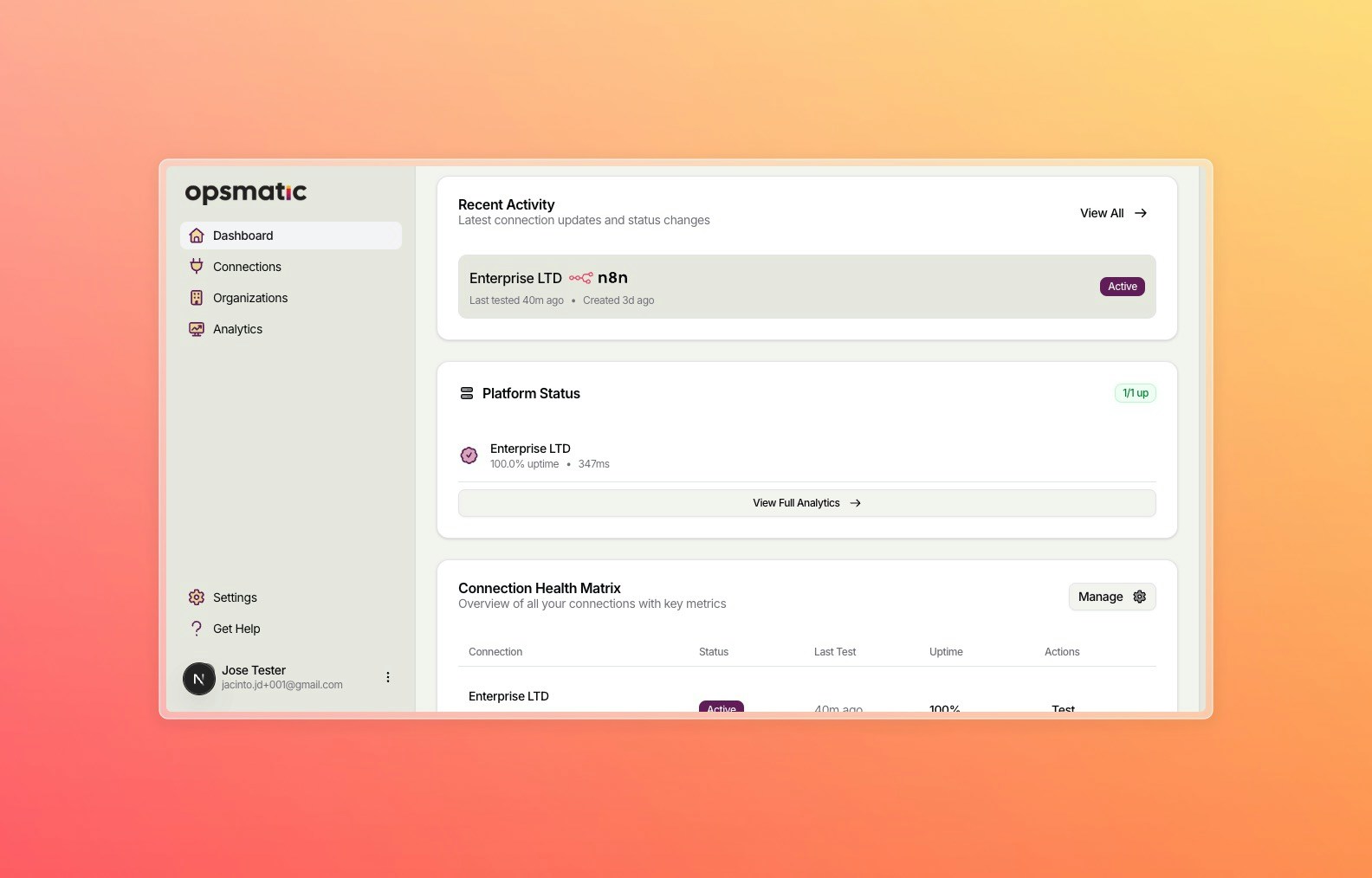
Opsmatic is a comprehensive monitoring and analytics platform designed specifically for automation workflows. Whether you're running complex n8n workflows or sophisticated Make.com scenarios, Opsmatic provides real-time insights, performance monitoring, and health tracking to ensure your automations run smoothly.
Track execution success rates, performance metrics, and identify bottlenecks across all your workflows.
Get instant insights into your automation performance with comprehensive analytics and reporting.
Connect and monitor both n8n and Make.com platforms from a single unified dashboard.
Organize your team, manage permissions, and collaborate on workflow monitoring across organizations.
## Key Features
### **Comprehensive Workflow Tracking**
Monitor execution status, duration, success rates, and error patterns across all your automation platforms. Get detailed insights into node-level performance and data processing volumes.
### **Advanced Analytics Dashboard**
Access real-time metrics, historical trends, and performance comparisons. Visualize your automation health with intuitive charts and customizable reporting periods.
### **Platform Availability Monitoring**
Ensure your n8n instances and Make.com scenarios are always accessible with continuous availability monitoring and uptime tracking.
### **Organization Management**
Create teams, invite members, and manage access permissions. Perfect for agencies, enterprises, and teams managing multiple automation environments.
### **Smart Alerting** *(Coming Soon)*
Get notified when workflows fail, performance degrades, or platforms experience downtime. Set custom thresholds and notification preferences.
### **Performance Optimization**
Identify slow-running workflows, resource-intensive processes, and optimization opportunities to improve your automation efficiency.
## Getting Started
Ready to start monitoring your workflows? Follow our [quickstart guide](/quickstart) to connect your first automation platform and begin tracking your workflow performance.
Get up and running with Opsmatic in under 5 minutes
## Supported Platforms
Connect your self-hosted or cloud n8n instances for comprehensive workflow monitoring
Integrate with Make.com (formerly Integromat) to track scenario executions and performance
## Need Help?
Explore our comprehensive guides and tutorials
Integrate Opsmatic with your existing tools and workflows
Get help from our support team
## What is Opsmatic?
Opsmatic is a comprehensive monitoring and analytics platform designed specifically for automation workflows. Whether you're running complex n8n workflows or sophisticated Make.com scenarios, Opsmatic provides real-time insights, performance monitoring, and health tracking to ensure your automations run smoothly.
Track execution success rates, performance metrics, and identify bottlenecks across all your workflows.
Get instant insights into your automation performance with comprehensive analytics and reporting.
Connect and monitor both n8n and Make.com platforms from a single unified dashboard.
Organize your team, manage permissions, and collaborate on workflow monitoring across organizations.
## Key Features
### **Comprehensive Workflow Tracking**
Monitor execution status, duration, success rates, and error patterns across all your automation platforms. Get detailed insights into node-level performance and data processing volumes.
### **Advanced Analytics Dashboard**
Access real-time metrics, historical trends, and performance comparisons. Visualize your automation health with intuitive charts and customizable reporting periods.
### **Platform Availability Monitoring**
Ensure your n8n instances and Make.com scenarios are always accessible with continuous availability monitoring and uptime tracking.
### **Organization Management**
Create teams, invite members, and manage access permissions. Perfect for agencies, enterprises, and teams managing multiple automation environments.
### **Smart Alerting** *(Coming Soon)*
Get notified when workflows fail, performance degrades, or platforms experience downtime. Set custom thresholds and notification preferences.
### **Performance Optimization**
Identify slow-running workflows, resource-intensive processes, and optimization opportunities to improve your automation efficiency.
## Getting Started
Ready to start monitoring your workflows? Follow our [quickstart guide](/quickstart) to connect your first automation platform and begin tracking your workflow performance.
Get up and running with Opsmatic in under 5 minutes
## Supported Platforms
Connect your self-hosted or cloud n8n instances for comprehensive workflow monitoring
Integrate with Make.com (formerly Integromat) to track scenario executions and performance
## Need Help?
Explore our comprehensive guides and tutorials
Integrate Opsmatic with your existing tools and workflows
Get help from our support team